For iPhone · Coming soon to the App Store
Keep the best shots. Clear the rest.
Gallery Audit is an iPhone app that groups the look-alikes, picks the best shots of every burst and shows what's worth clearing. It runs right on your iPhone, and nothing is deleted until you confirm.
- On-device AI
- Photos never uploaded
- Favorites always kept
- Nothing deleted until you confirm
One demo library: 5,009 photos, one year, one audit.
- Similar-shot groups, winners already picked
- 795
- Near-duplicate extras flagged
- 1,145
- Space those extras were using
- 3.26 GB
- Discards on one 747-photo trip to Portugal
- 95
From a demo library of one year of photos. Sample photos are AI-generated. Your numbers will depend on how you shoot.
From camera roll chaos to a clean library in three steps
- Pick a range
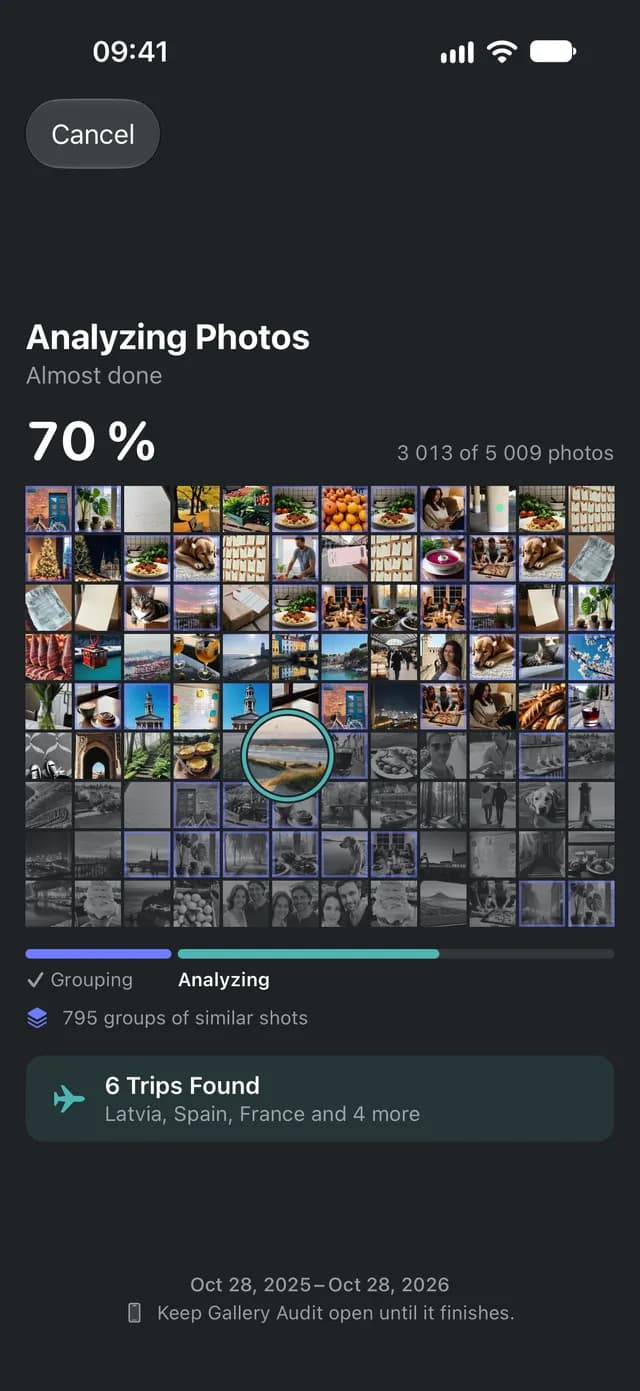
- Grouping
- Analyzing
Pick what to audit
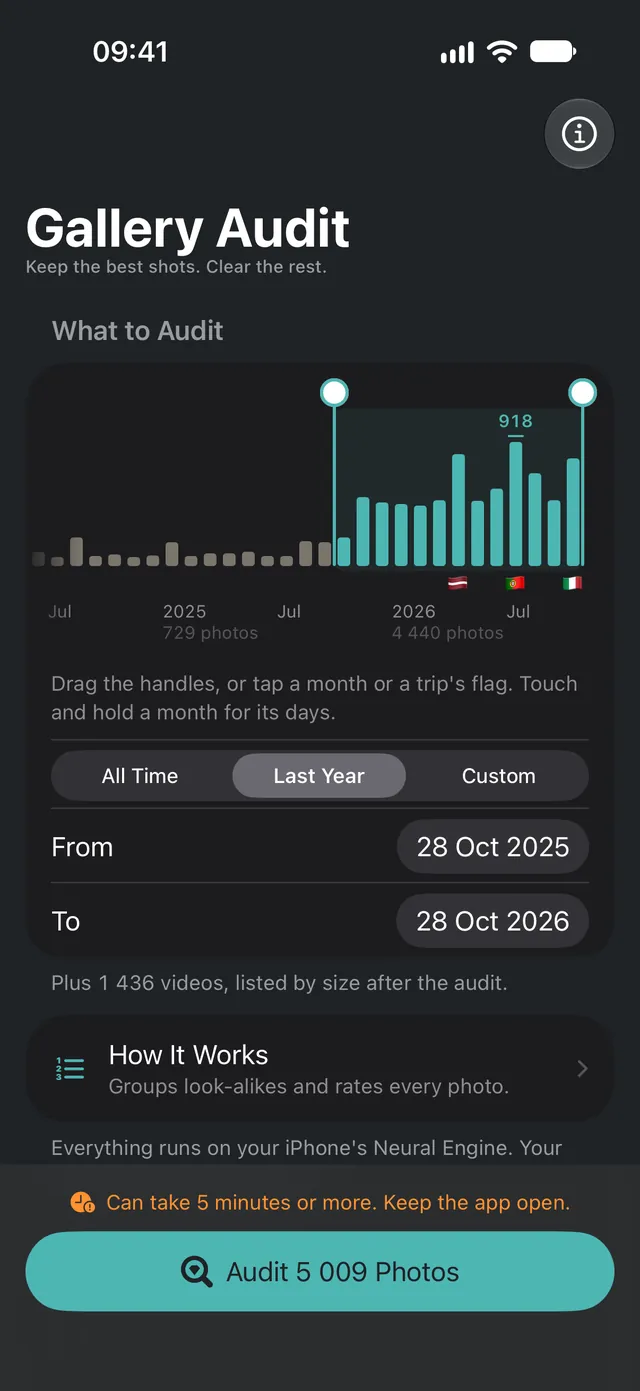
Drag across a chart of your library, month by month, tap Last Year, or tap a trip's flag to pick just that trip. You see the photo count before you start. How long the audit takes depends on how many photos are in the range, and the app warns you when it will take a while.
Run the audit on your iPhone
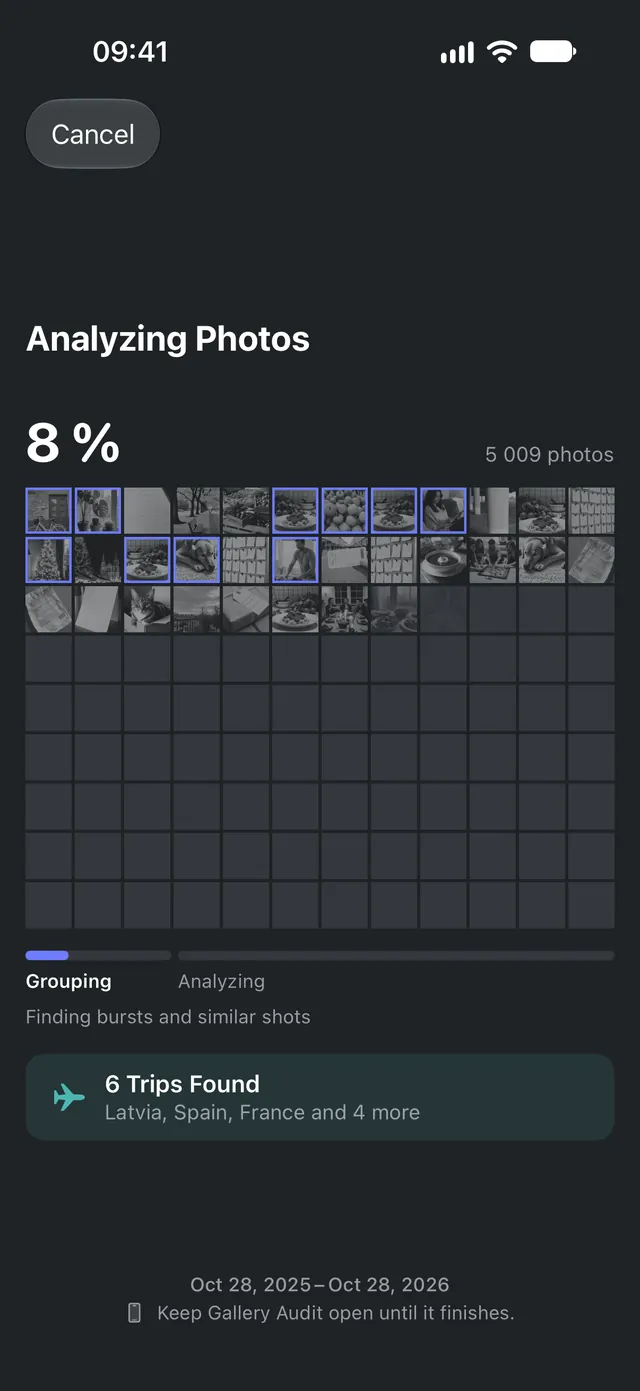
It groups look-alike shots first, then checks every photo for sharpness, exposure, faces and composition.
Review, keep the best, clear the rest
Check the picks, choose what to clear and confirm it in one batch. With Pro, save your best shots as an album first.
Every photo gets a verdict, and a reason
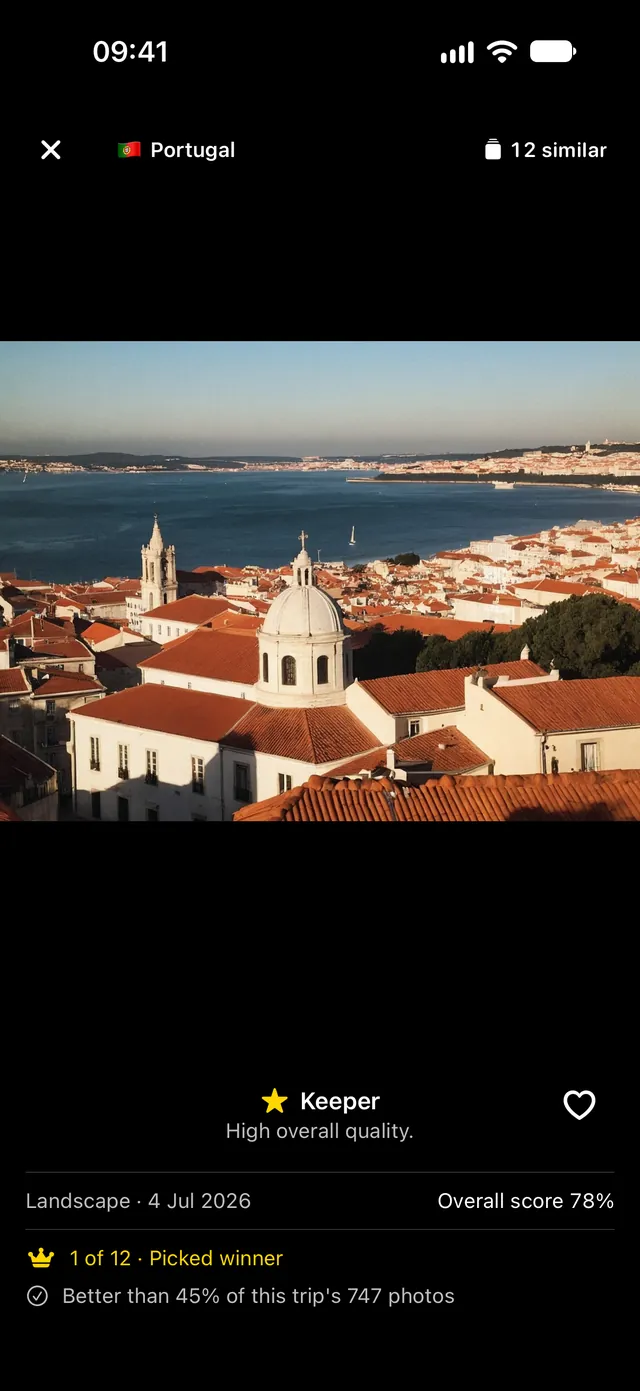
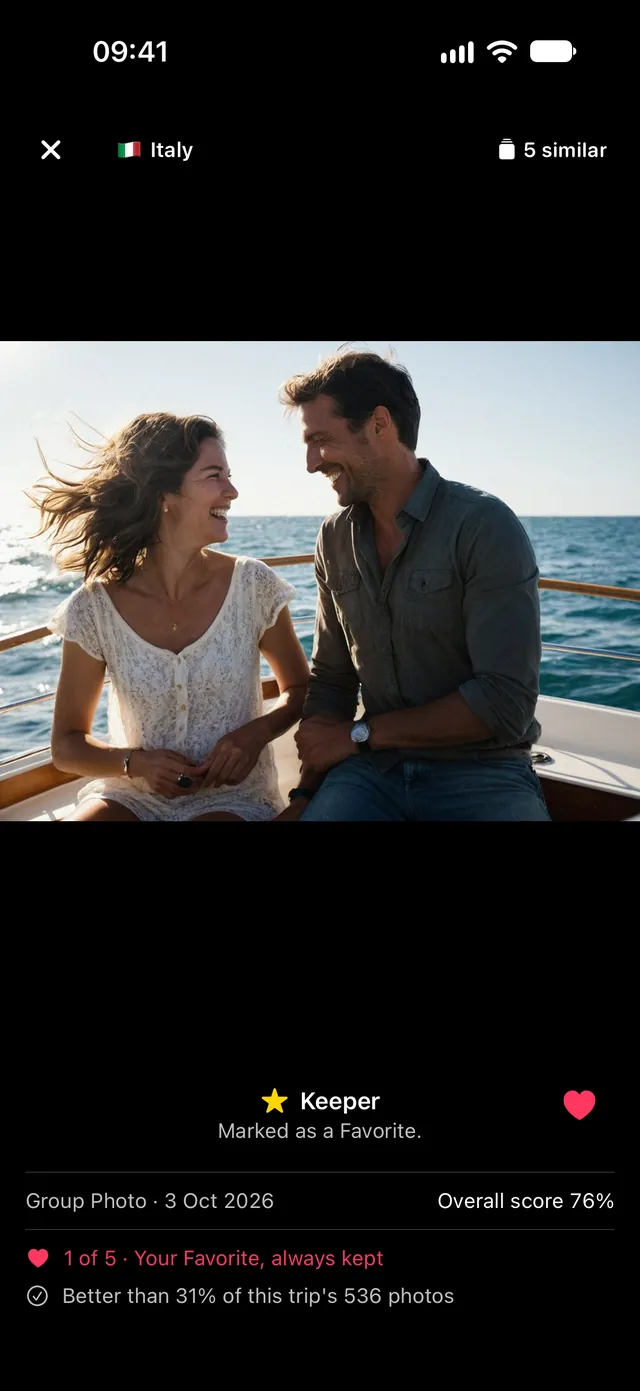
Tap any photo to see why it landed where it did: its overall score, what kind of shot it is, which group of similar shots it belongs to and how it ranks within its trip.
It works out what the photo is
A selfie, a group shot, a portrait, a landscape or a close-up, so each one is judged by what matters for that kind of shot.
It checks the photo itself
Sharpness on the subject, exposure, faces, composition and lens smudges, plus Apple's on-device aesthetics model.
It compares it with its neighbors
Other shots of the same moment and the rest of its trip. The verdict comes from where it stands, with the reason spelled out.
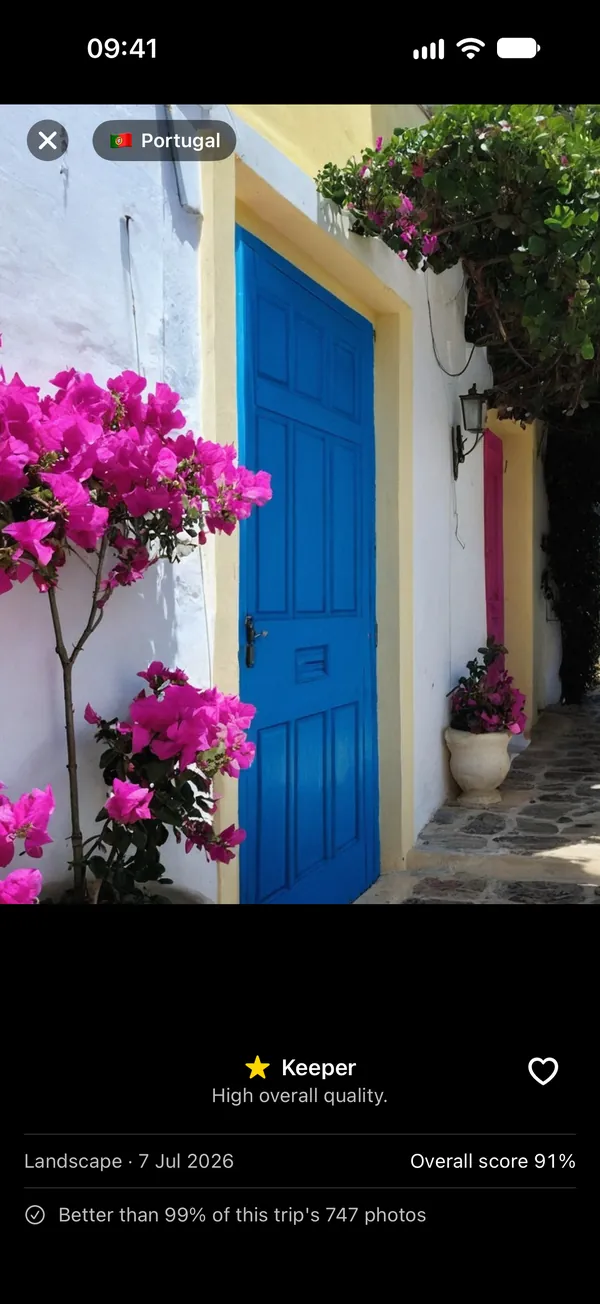
The shot worth keeping
A strong photo that stands out from the rest of its trip. This one scored 91%, better than 99% of the 747 photos from the same trip.
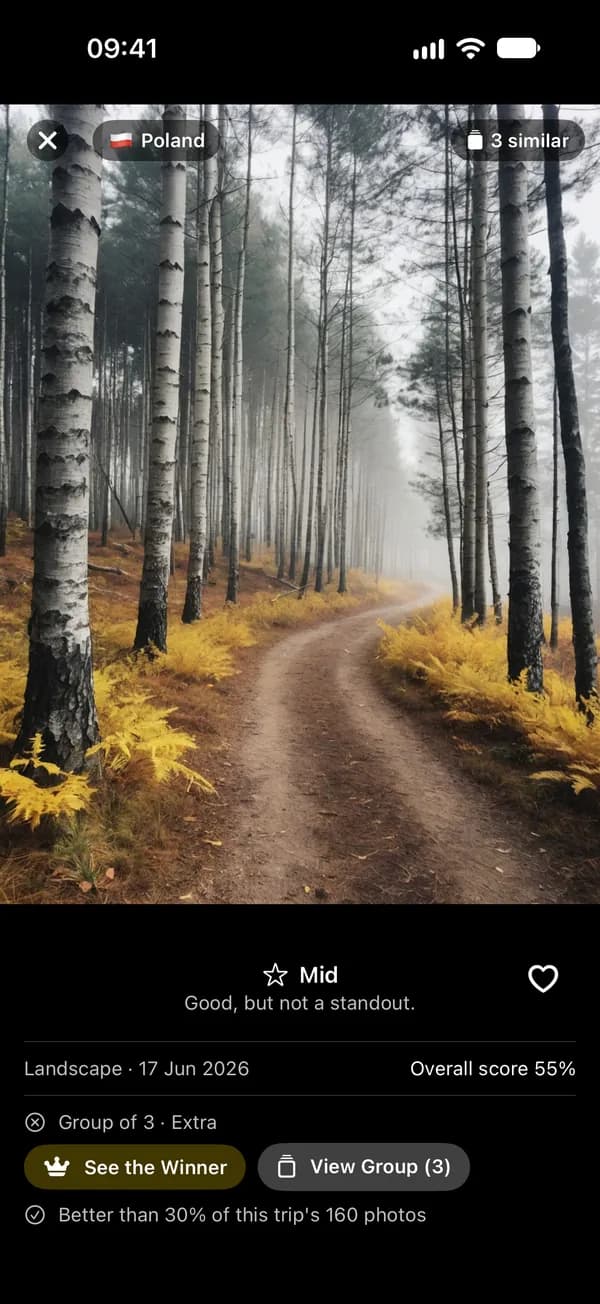
Fine, but not the one
Nothing wrong with it, nothing special either. It scored 55% as an extra in a group of three, where a better shot exists, and it stays unless you decide otherwise.

Likely worth clearing
A clear reason every time. This portrait is blurry or poorly exposed, and among the weakest of the 747 photos from the same trip.
Discard is never a guess. A photo only lands there for a clear reason: it's badly blurred or exposed, a clearly better shot of the same moment exists, or it's one of a trip's weakest shots, clearly below the rest of it. A good score for looks can lift a photo up, but a low one can't push it down.
Want to see what your own library gets?
All the judgment calls, made for you
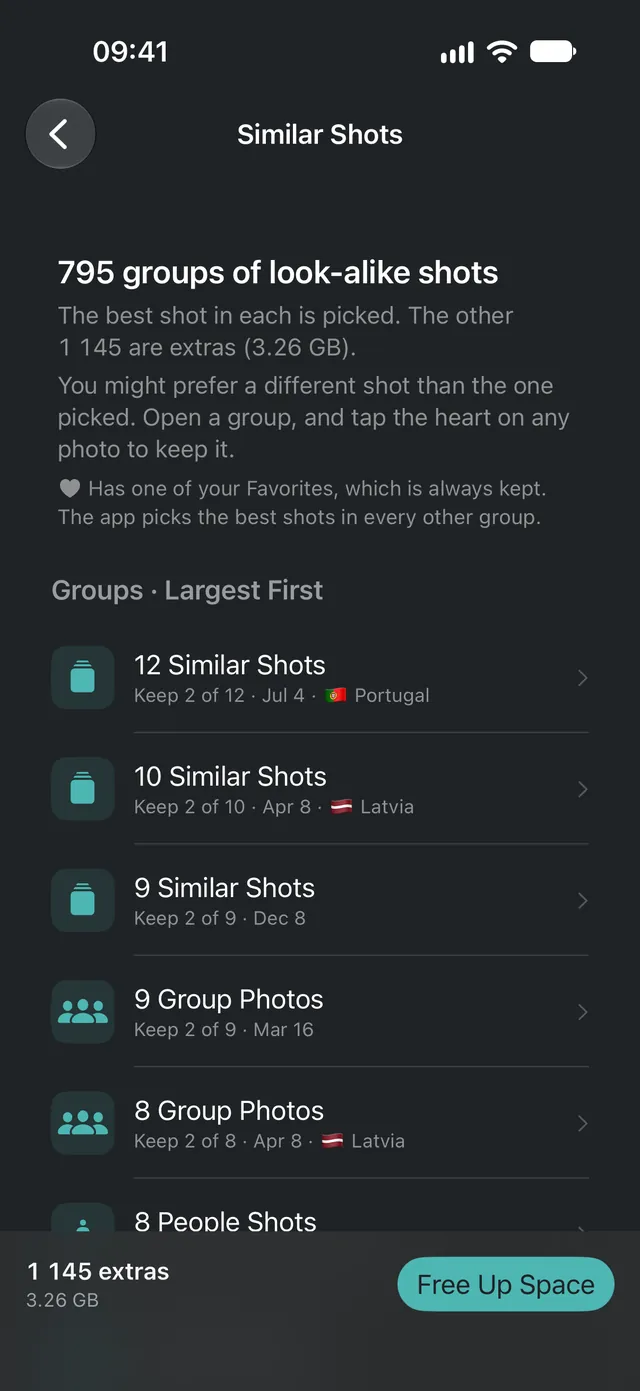
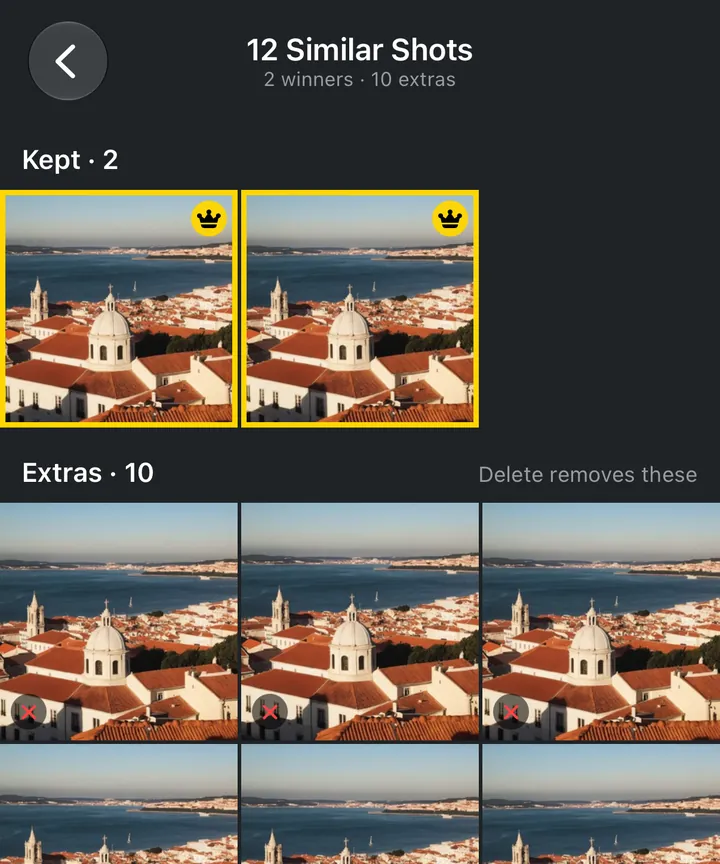
Similar Shots
Twelve shots of the same view? It picks the best two.
Stop at a viewpoint and you walk away with a dozen near-identical frames. Gallery Audit finds every group like that across your whole library and has already picked the winners of each. The bigger the group, the more it picks.
- Bursts are grouped automatically. Other photos taken close together, up to a few minutes apart, are compared visually and grouped when they match.
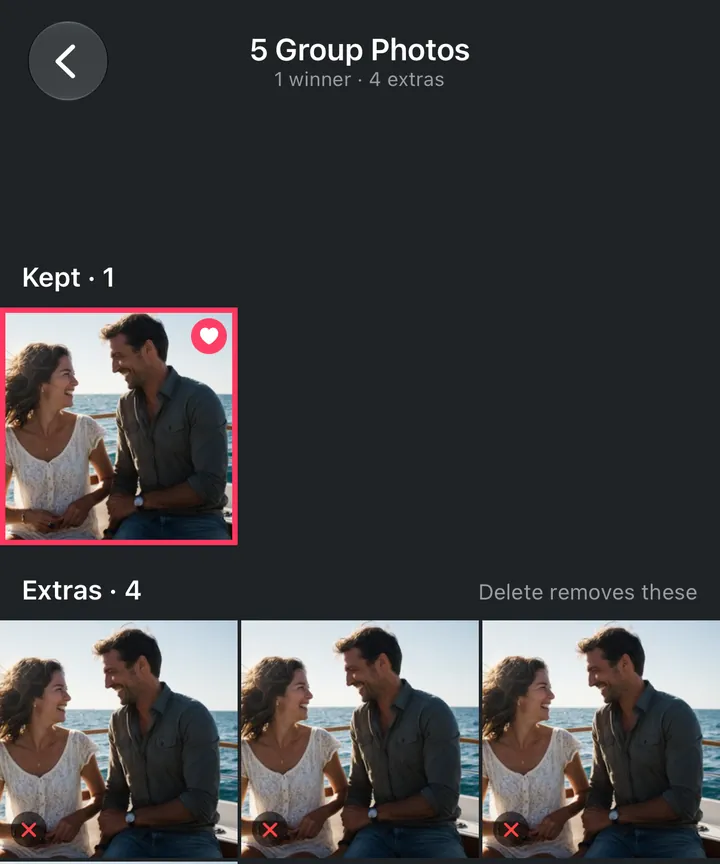
- How many shots are kept depends on the group's size: the best one for up to 6 shots, the best two for 7 to 12, and the best three for 13 or more. Any photo you've hearted is kept as well, even past that, and the rest become extras.
- Open any group to see what's kept and what's an extra before deleting, and tap the heart on any photo to keep it instead.
- Doubt a pick? From any extra, See the Winner shows the shot it lost to, double-tap zooms in to check the blur, and you can swipe from one group to the next.
Trips
Your trips, found, trimmed and saved
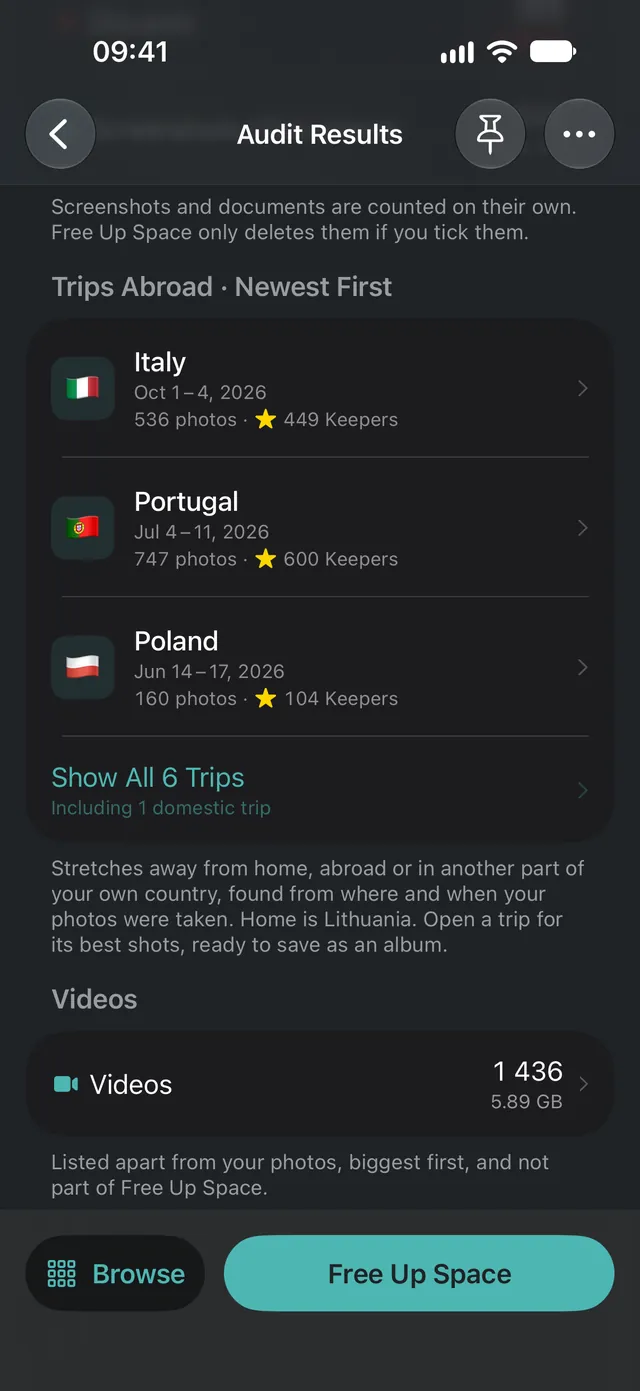
Holidays are where camera rolls explode. Gallery Audit rebuilds your trips from photo location and dates, trims each one down to its best shots, and with Pro saves the highlights as an album.
- Works out where home is, then turns every stretch away into a trip. Trips can cross borders, like Spain → France.
- Trips at home count too: a few days in another region of your own country show up as domestic trips, apart from the ones abroad.
- Your trips show as flags on the start screen's timeline before you've audited anything, so you can tap one and audit just that trip.
- Flags each trip's weakest shots (up to the bottom 20%, and only ones clearly worse than the trip's typical photo), so Portugal's 747 photos end up with 95 Discards.
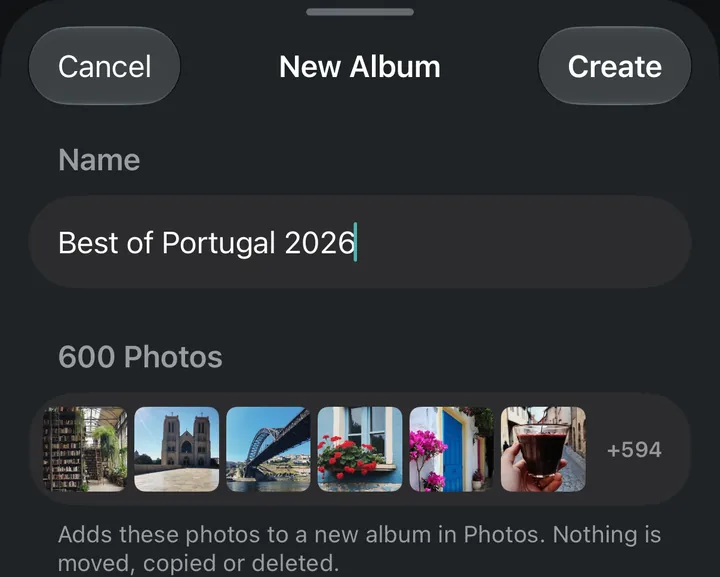
- Tap a trip to see its Keepers, then, with Pro, save them as a new album in Photos, already named for you: 600 photos in “Best of Portugal 2026”.
Content-aware scoring
Scoring that knows what it's looking at
A good selfie and a good landscape fail in different ways. Gallery Audit works out what each photo is before it judges it, so it isn't marked down for the wrong thing.
- Recognizes selfies, portraits, group shots, people, close-ups and landscapes, and spots people even when their face isn't visible.
- Measures sharpness on the subject, not the whole frame, so a portrait with a soft background isn't treated as blurry.
- Checks exposure, composition, level horizons and even lens smudges.

Biggest videos
Find the videos eating your storage
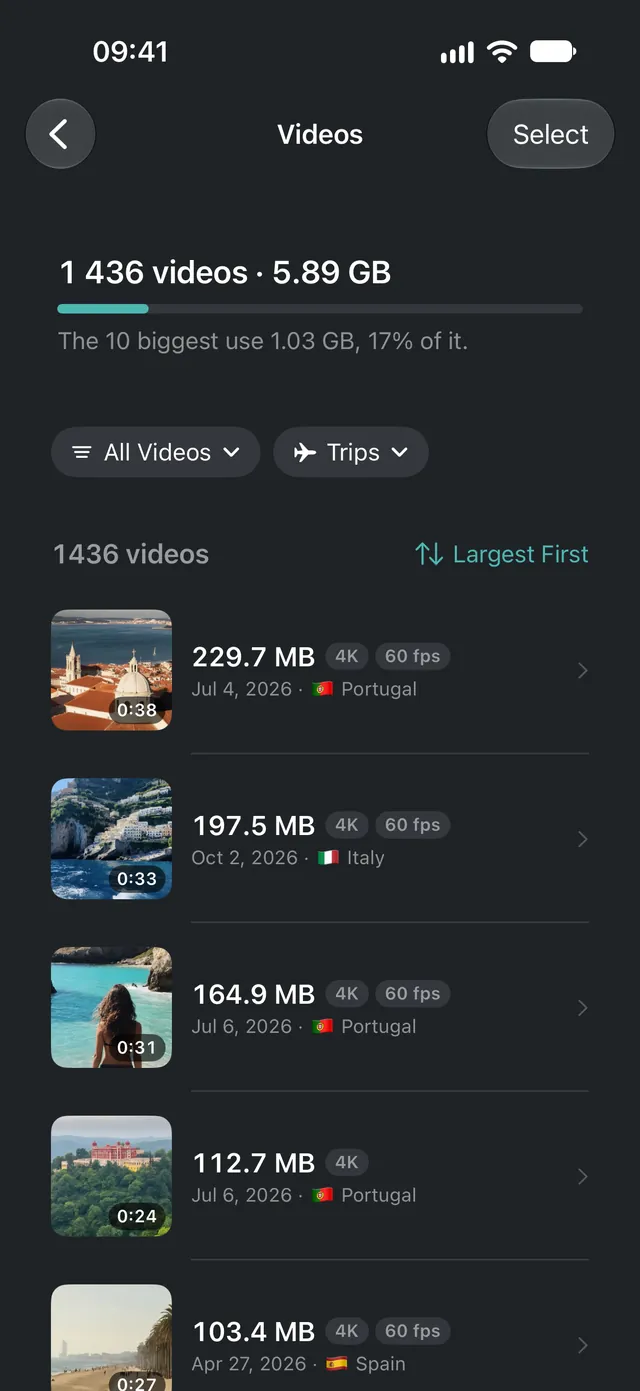
Videos are often the biggest thing in a camera roll, and Gallery Audit doesn't rate them. Instead it lists every video in your range, largest first, so the few that take the most space are easy to spot. In the demo library, the 10 biggest of 1,436 videos use 1.02 GB.
- Largest first by default, or newest first. Filter to screen recordings, clips under 5 seconds or over 5 minutes, slo-mo, 4K, time-lapse or Cinematic, or to one trip, and see how much space the filtered list takes.
- See each video's size, length and date at a glance, with a badge on 4K and high frame rates, and play any of them before you decide.
- Select several, or swipe one away, and confirm. Favorites can't be selected, videos are never part of Free Up Space, and deleted videos usually stay in Recently Deleted for 30 days.
Free Up Space
See the payoff, then choose what goes
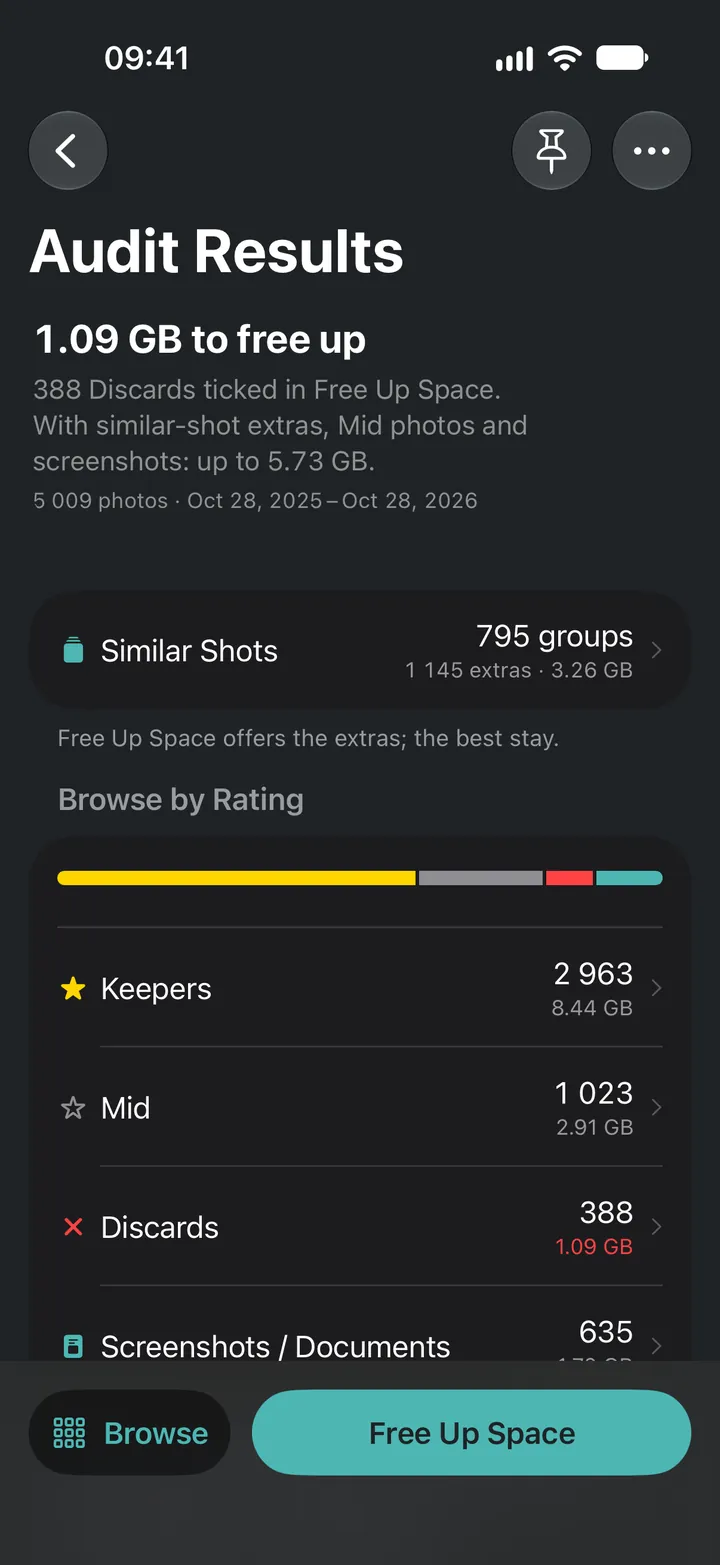
Every audit ends with a breakdown of your library and the space each part takes. Free Up Space gathers everything worth clearing into four groups and adds up the photos and space as you tick them.
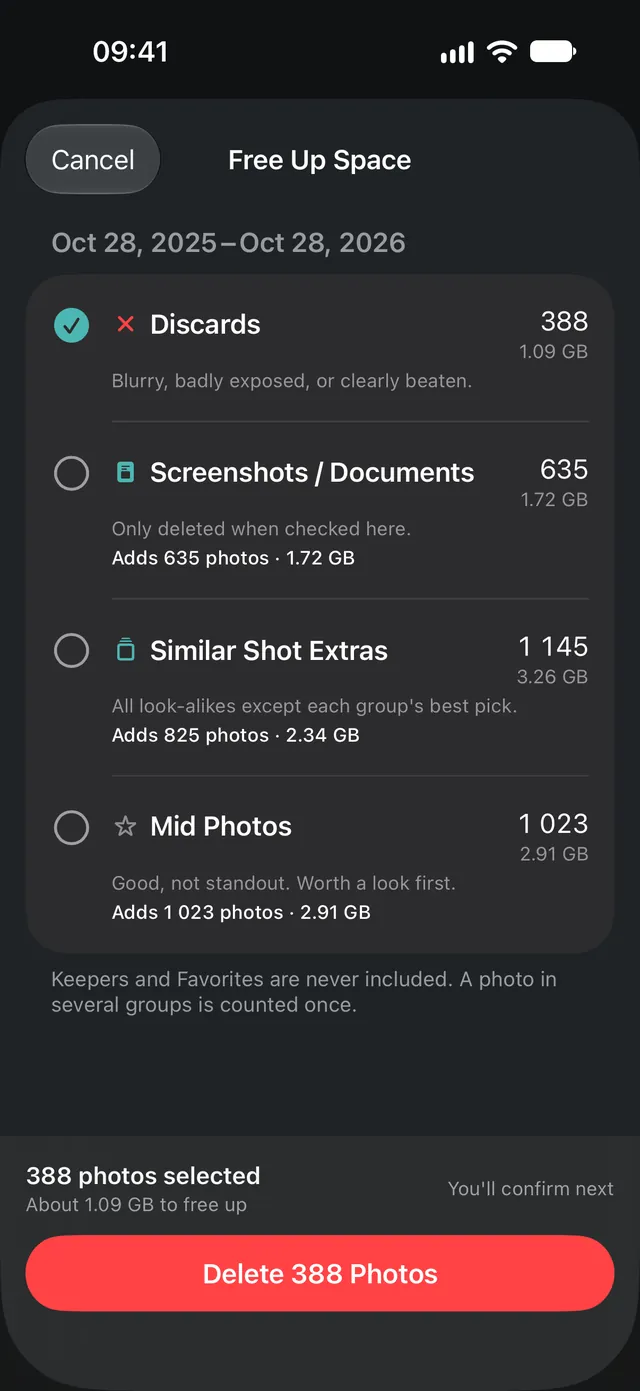
- Keeper, Mid and Discard counts, each with its size in GB. Screenshots and documents are counted apart and only cleared when you tick them.
- Discards are ticked for you. Add screenshots, similar-shot extras or Mid photos with one tap, and a photo in two groups is only counted once.
- Tick all four and 2,046 photos (about 5.73 GB) are cleared in one go with Pro, leaving only your Keepers. The free version clears up to 50 at a time.
- Not ready to delete? With Pro, save the Discards as an album and look through them in Photos first.
See all 26 features
- Keeper, Mid and Discard
Every photo gets a verdict and a reason.
- Similar-shot grouping
Look-alike shots are grouped and named by what's in them.
- Best shots picked
One to three winners per group, depending on its size, plus any Favorites.
- See the Winner
From any extra, jump to the shot it lost to, and double-tap to zoom in and check the blur.
- Burst-aware
Bursts are grouped, and iPhone's own burst pick is protected.
- Subject-aware sharpness
Judges faces and subjects, so soft backgrounds and Portrait mode blur never count against them.
- Scene recognition
Tells selfies, groups, close-ups and landscapes apart.
- Composition and horizons
Rewards well-framed shots and level horizons.
- Lens smudge detection
Spots hazy photos taken through a dirty lens.
- Trip detection
Rebuilds trips from location and dates, even across borders, plus domestic trips to another region at home.
- Trips on the timeline
Your library's trips show as flags on the start screen's timeline before any audit. Tap one to pick its days.
- Screenshot sorting
Screenshots, receipts and documents are grouped separately.
- Home country check
See which country it treats as home, so your trips make sense.
- Album creation
With Pro, save a trip's best shots, a search or any rating as an album in Photos, even the Discards, to look through before deleting.
- Storage forecast
See how many GB you'll free before you delete.
- Biggest videos
Lists your videos largest first (or newest first), filterable by kind (screen recordings, short or long clips, slo-mo, 4K, time-lapse, Cinematic) or trip, with multi-select delete. Never rated or part of Free Up Space.
- Choose what to clear
Discards, screenshots, similar-shot extras or Mid, counted once, never Keepers.
- Favorites protected
Hearted photos are always Keepers.
- Recently Deleted first
Deletions go to Recently Deleted, where they usually stay for 30 days (not if your iCloud storage is full).
- Share from Photos
Select photos in the Photos app, tap Share and choose Gallery Audit to audit just those.
- Search
Find photos in an audit by year, month, place, kind of photo, Favorites or Similar Shots.
- Recent audits
Reopen your last five audits and pick up where you left off. Pin up to three to keep them.
- Extend an audit
With Pro, widen a saved audit's dates, like up to today. Only the new photos are scored.
- Audit Options
With Pro, choose Faster, Standard or Detailed analysis, and stricter or looser grouping of similar shots.
- iCloud Photos support
Full-size originals are downloaded when needed.
- On-device AI
No account, and your photos are never uploaded.
Be first to try it
Gallery Audit is almost ready. Join the list and we'll email you the day it's on the App Store.
Free to audit. Pro when you're ready to clear.
Every audit is free, with every verdict, group and trip. Pro is for clearing a lot at once and saving what you keep.
Free
Free to download
- Unlimited audits, with a verdict and a reason for every photo
- Similar Shots, trips, biggest videos, search and Recent Audits
- Share a few photos from Photos to find the best one
- 50 deletes to start, then 20 more each day, up to 50 at a time
Gallery Audit Pro
Monthly, yearly or once
- Unlimited deletes. Clear as many photos and videos as you like in one go.
- Albums. Save a trip's best shots, a rating or a search as an album in Photos.
- Extend an audit. Widen a saved audit to new dates. Only the new photos are scored.
- Audit Options. Faster, Standard or Detailed analysis, and stricter or looser grouping.
- YearlyA subscription, billed once a year
- MonthlyA subscription, billed every month
- One-time purchasePay once, no subscription
Prices vary by country, and the App Store shows yours in your currency before you buy. Every plan unlocks the same Pro. Subscriptions renew automatically unless cancelled at least 24 hours before the end of the period; manage or cancel them in Settings. Restore a purchase from About in the app. Terms of Use.
Your photos never leave your iPhone
Read the privacy policy →On-device AI
Every photo is analyzed with Apple's built-in Vision models on your iPhone's Neural Engine. No cloud processing.
No account. Photos never uploaded.
There's nothing to sign up for and nowhere to upload to. The app doesn't track you.
Optional usage stats
If you opt in, the app shares usage stats that aren't linked to you, like which features you use. Never photos or where they were taken.
Safe by design
Your favorites are off-limits
Gallery Audit suggests. You decide. Nothing leaves your library unless you tell it to.
- Any photo you've hearted in Photos is always a Keeper, whatever its score.
- Free Up Space never includes Keepers, so a Favorite can't be selected for deletion.
- Nothing is deleted until you confirm, and deleted photos go to Recently Deleted, where you can usually recover them for 30 days.
Questions, answered
More on the support page.
Are my photos uploaded anywhere?
No. All analysis runs on your iPhone, and there's no account. Trip countries are worked out on your iPhone too. The app only goes online to download full-size originals from your own iCloud Photos, to reach the App Store for Gallery Audit Pro, and, only if you turn it on, to send usage stats that aren't linked to you. Photos are never sent.
Will it delete photos without asking?
Never. Nothing is deleted until you choose what to clear in Free Up Space and confirm, and deleted photos usually stay in Recently Deleted for 30 days in case you change your mind (if your iCloud storage is full, iOS deletes them right away).
What if it rates a photo wrong?
Discard is kept for clear cases: a badly blurred or exposed shot, a clearly better version of the same moment, or one of a trip's weakest shots, clearly below the rest of it. A low score for looks alone never marks a photo Discard. You see everything before it goes, and your Favorites are always Keepers.
Will it always pick the photo I would?
Gallery Audit analyzes every photo in depth: sharpness, exposure, lens smudges, faces, composition, and how each shot compares with others from the same moment. Taste is personal, though, and in some cases you might choose a different one. Nothing is deleted until you review and confirm it, Favorites are always kept, and deleted photos usually stay in Recently Deleted for 30 days.
Does it find and delete similar photos on my iPhone?
Yes. The Duplicates album in Photos only finds copies of the same image. Gallery Audit also groups bursts and look-alike shots taken minutes apart, picks the best one to three of each group (and any Favorites in it) and marks the rest as extras you can clear in Free Up Space. Nothing is deleted until you confirm.
Can I check just a few photos?
Yes. In the Photos app, select the shots you're choosing between, tap Share and choose Gallery Audit. It audits only those photos, picks the best and marks the rest as extras, all on your iPhone.
Is Gallery Audit free?
It will be free to download. Audits are free. The free version deletes 50 photos and videos to start, then 20 more each day, up to 50 at a time. Gallery Audit Pro deletes as many as you like, saves albums, extends audits to new dates and unlocks Audit Options, as a monthly or yearly subscription or a one-time purchase. Prices vary by country, and the App Store shows yours before you buy.
Will it free up storage on my iPhone?
You see how much space Keepers, Mid, Discard and screenshots take, and Free Up Space adds up the photos and GB as you tick what to clear, so you know what you'll get back before you delete. Deleted photos usually stay in Recently Deleted for 30 days, so the space comes back when you empty it there or the 30 days pass (straight away if your iCloud storage is full).
Does it work with iCloud Photos?
Yes. If Optimize iPhone Storage is on, Gallery Audit downloads full-size originals as it needs them, so audits can take a little longer.
What do I need to run it?
An iPhone running iOS 26 or later. Gallery Audit is made for iPhone: there's no Android version, and no separate iPad or Mac version.
Who makes Gallery Audit?
BYTE REFINE, MB, a small partnership (mažoji bendrija) registered in Lithuania, based in Vilnius. We make the app and this website, and you can reach us at support@galleryaudit.app.
When is Gallery Audit coming out?
It's coming soon to the App Store, and we haven't announced a launch date yet. Join the waitlist on this page and we'll email you once when it launches, then delete your address.